
Applying for Aid
Where To Begin
It all starts with the Free Application for Federal Student Aid (FAFSA)!
Every contributor (students, a biological or adoptive parent, a parent's spouse, or the student’s spouse) required to provide information on the FAFSA must have a studentaid.gov account before accessing and completing their section of the FAFSA.
An account allows students and contributors to complete and sign the FAFSA electronically. Keep login information safe and accessible; it will be used each year the FAFSA is completed.
The FAFSA must be completed each year a student attends Salem State to receive financial aid.
Students will be considered for all federal, state, and institutional aid. The FAFSA is required to be considered for Salem State scholarships and many others.
Financial aid is awarded on a first-come, first-served basis. Submitting the FAFSA as early as possible will help ensure students get the maximum financial aid they're eligible for.
Are There Deadlines?
Yes! There are federal and state deadlines based on the aid year. If you are not from Massachusetts, be sure to check your state deadline.
The 2026–2027 FAFSA is available for the award year that runs from July 1, 2026, to June 30, 2027.
The Massachusetts state deadline is June 30, 2026.
Before Starting the FAFSA
Create a Studentaid.gov Account
We recommend that students and their contributor(s) create StudentAid.gov accounts before starting the FAFSA.
When creating an account, be careful to enter your name and Social Security number (SSN) exactly as they appear on your Social Security card.
Students and contributors can access their studentaid.gov accounts using their account usernames and passwords.
Gather Needed Documents
The following information or documents will be needed to fill out the FAFSA:
- Tax returns
- Records of child support received
- Current balances of cash, savings, and checking accounts
- Net worth of investments, businesses, and farms
Have Contributor Information Ready
To invite contributors to the 2026–2027 FAFSA, students only need to enter the contributor’s email address. Make sure to use the email associated with the account the contributor will most likely check; it doesn’t have to match the one they provided when creating their studentaid.gov account.
For information on inviting contributors to the 2026-2027 FAFSA, please visit studentaid.gov.
Starting the FAFSA
If you are starting the FAFSA form for the first time on fafsa.gov, select “Start New Form” and enter your account username and password to access the FAFSA form.
Determining Dependency Status
The FAFSA asks a series of questions to determine whether a student is dependent or independent for federal student aid eligibility. If a student is determined to be dependent, they must report their parents' information along with their own. Find more information on dependency status at studentaid.gov.
Reporting Parent’s Information
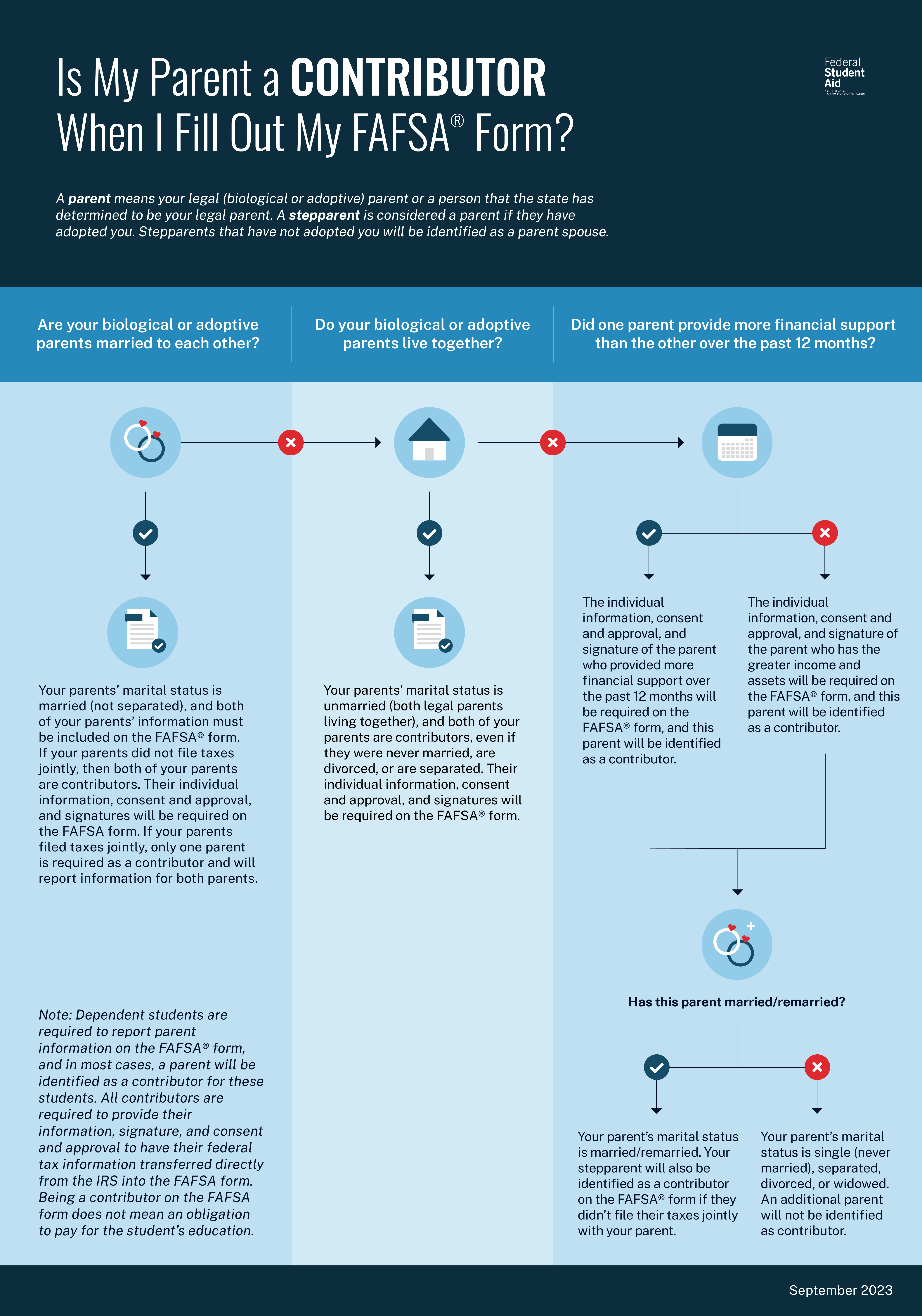
Dependent students need to report parent information on their FAFSA form.
Visit the following pages to find out who counts as a parent, what to do if you don’t live with your parents, and what to do if you don’t have access to your parents’ financial information.
- Reporting Parent Information
- Who’s My FAFSA Parent?
- Is My Parent A Contributor When I Fill Out The FAFSA?
Reporting Spouse’s Information
Students who are married (and not separated) and have filed taxes jointly with their current spouse will report their spouse’s information on the FAFSA form, but their spouse will not be identified as a contributor.
Students who are married (and not separated) and didn’t file taxes jointly with their current spouse will have their spouse listed as a contributor on their FAFSA form, and their spouse will need to complete their section of the form.
Providing Financial Information
The FAFSA asks for financial information, including information from tax forms. The 2026–27 FAFSA asks for 2024 tax information.
The FAFSA form also asks for asset information, such as current balances of checking and savings accounts.
The 2026–2027 FAFSA form asks for students or their parents’ marital status as of the day you fill it out, but then requires students or their parents to add income and tax return information from 2024. If your or your parent’s marital status has changed since filing the 2024 tax return, find details on how to report financial information on the FAFSA form.
Automatically Transferring Tax Information
Federal tax information of students and their contributors will be transferred from the IRS into the FAFSA.
Even if contributors don't have a Social Security Number (SSN), haven't filed taxes, or have filed taxes outside the U.S., they will still need to provide consent and approval.
All contributors must provide consent and approval for the U.S. Department of Education to:
- disclose their personally identifiable information provided on the FAFSA form to the IRS to match their information with their tax information;
- obtain their federal tax information from the IRS and include it with the FAFSA form;
- use their federal tax information to determine their Student Aid Index and Federal Pell Grant eligibility;
- share their federal tax information with colleges, career/trade schools, and state higher education agencies for use in awarding and administering financial aid; and
- reuse their federal tax information on another FAFSA applicant's form (e.g., if a parent has multiple dependent students or for a parent's own FAFSA form as an aid applicant).
If a required contributor doesn't provide consent and approval to have their federal tax information transferred into the FAFSA form, the student will not be eligible for federal student aid—even if the contributor manually enters tax information into the FAFSA.
Listing Colleges
When completing the FAFSA form, students must list at least one school to receive their information. The schools listed will use the FAFSA information to determine the types and amounts of aid a student may receive.
List Salem State University’s federal school code in the School Information section so we can receive your FAFSA information.
Salem State's Federal School Code is 002188.
If our school code is not listed, we will not receive your FAFSA information.
Signing and Submitting the FAFSA
After a student completes their part of the FAFSA, they will acknowledge the terms and conditions, electronically sign, and submit their portion. However, the FAFSA won’t be considered complete until all required contributors provide their information, consent and approval to transfer federal tax information into the form, and sign the form.
Once all contributors have signed and submitted the FAFSA, it will be considered complete and ready for processing.
Students who submit the FAFSA will receive a confirmation page that displays their completion date, data release number, and next steps. They’ll also see an estimated Student Aid Index, estimated Federal Pell Grant eligibility, and details on other federal student aid they may qualify for. This confirmation page is automatically emailed to students for their records.
Dependency Status
The information students provide on their FAFSA determines their dependency status. The federal government has specific guidelines for determining whether a student is considered dependent or independent for financial aid purposes. If parents are unwilling to provide their information for the FAFSA, please visit studentaid.gov for more details.
Not living with parents, not being claimed on parents' tax forms, or parents' refusal to help pay for college does not make a student an independent student for federal financial aid purposes.
Students who choose to live financially independent of their parents, whether by choice, circumstances, employment, or geography, are also not considered independent under Federal guidelines.
Unusual Circumstances
In certain situations, a student can submit their FAFSA without their parents' information if they have no contact with their parents due to unique circumstances:
- A student's parents are incarcerated
- A student left home due to an abusive family environment
- A student does not know where their parents are and is unable to contact them (and the student has not been adopted).
- A student is older than 21 but not yet 24, is unaccompanied, and is either homeless or self-supporting and at risk of being homeless.
When filling out the FAFSA, students will be asked whether they can provide their parents' information. If they cannot, they can specify a unique circumstance that prevents them from doing so. Students who submit their FAFSA this way will have it rejected and not entered into Salem State's financial aid system.
Students who meet the above requirements may be eligible for a dependency override. They must submit several documents to substantiate their situation. We do not grant dependency overrides based on financial independence.
Parents with Special Financial Circumstances
Parents who have experienced the following special financial circumstances should still submit the FAFSA. Once Salem State receives the student’s FAFSA, we encourage the student to file a Special Circumstances Appeal form.
Special financial circumstances may include the following situations:
- significant changes to a parent’s financial situation, such as loss of employment or pay cuts
- tuition expenses at an elementary or secondary school
- high amounts of medical or dental expenses not covered by insurance
- a family member who recently became unemployed
- other changes in income or assets that may affect your eligibility for federal student aid
For more details on the Special Circumstance Appeal process, including specific guidelines, please visit How Do I File a Financial Aid Appeal?
What Happens After the FAFSA is Submitted?
Check Your FAFSA Status
Students can check the status of their FAFSA by logging in to their studentaid.gov account and selecting their FAFSA submission in the "My Activity" section of their account dashboard.
If students submit a paper FAFSA, they can check its status after it has been processed (about 7–10 days after the mailing date).
The status of the application will be one of the following:
- Draft: A section of the FAFSA form is incomplete.
- In Progress: You have provided your consent, approval, and signature for your section of the FAFSA form, but it has not been submitted yet.
- In Review: The FAFSA form was submitted but has not yet been processed.
- Action Required: You are missing your consent and approval or signature, or the FAFSA form was processed but requires correction.
- Processed: Your application was processed successfully. No further action is needed.
- Closed: Your FAFSA form was never submitted and can no longer be submitted because the federal FAFSA deadline has passed.
Review Your FAFSA Submission Summary
The FAFSA Submission Summary summarizes the information submitted to the FAFSA. Students receive their FAFSA Submission Summary after their FAFSA form is processed.
The FAFSA Submission Summary won't show how much financial aid a student will receive.
Be sure to review the FAFSA Submission Summary carefully to ensure there are no mistakes on your FAFSA, and make corrections to your FAFSA data if necessary.
If consent and approval were provided to obtain federal tax information from the IRS, the FAFSA Submission Summary won't display a student's or parent's income or tax information.
Verification
Verification is the process of confirming that the information reported on the FAFSA form is accurate. The U.S. Department of Education randomly selects students for verification. A note will appear on the FAFSA Submission Summary if a student is selected for verification.
Students will receive a notification from Salem State confirming their selection for verification. They can log in to their Navigator account to view their To-Do List, which lists the requested documents and instructions for submitting the information.
Generally, students will be asked to complete/provide one or more of the following forms:
- Federal Tax Transcript
- Verification Worksheet
- Asset Threshold Form
- Property Verification Form
- Disability Discharge Form
- Prior Degree Worksheet
Delays in completing verification requirements will impact financial aid eligibility and can result in the following:
- Financial holds on their account
- Inability to move into your residence hall
- Restricted access to registration, grades, transcripts, etc.
Students will not be awarded financial aid until they complete the verification process.
Need Help Filling Out the FAFSA?
If you need help filling out the FAFSA form, use these free tools:
- In the online FAFSA form, select the question mark icon next to a FAFSA question to view a “tool tip” that provides information about how to answer that question.
- Visit FAFSA Help to find answers to common questions.
- Chat with Aidan, the FSA virtual assistant, in the online form.